If you like TickTick’s quick capture and flexible organization but want your personal tasks in iCloud, Pinwork is worth trying. It brings natural-language input, projects, tags, and filters together with an optional guided project review and linked Apple Calendar events. One lifetime purchase covers its iPhone, iPad, Mac, and Apple Watch apps.
TickTick already has natural-language input, tags, lists, and custom filters. Pinwork adds a guided project review and the option to keep your personal tasks in iCloud without a separate app account. TickTick also covers Windows and Android, shared lists, habits, and a Pomodoro timer.
At a glance
| Pinwork | TickTick | |
|---|---|---|
| Typed capture | Dates, repeats, estimate, tags, project, and Calendar commands | Smart Recognition for dates, times, and repeats |
| Organization | Projects with notes and status; tags on tasks and projects | Lists, tags, and nested subtasks |
| Filters | Combine status, estimate, tags, project, and date criteria | Custom filters with AND/OR conditions, included in Premium |
| Project workflow | Optional Next Actions, Waiting For, and guided Review | Flexible lists and filters, plus habits and focus tools |
| Apple Calendar | Create an event linked to a task, using its estimate | Calendar connections, local calendars, and subscriptions |
| Task sync | Private iCloud database; no Pinwork account | TickTick service |
| One-time purchase | $79.99 lifetime across supported Apple devices | None listed |
| Subscription | $4.99 monthly or $34.99 yearly | Premium at $4.99 monthly or $49.99 yearly |
| Free tier | None; 7-day trial on subscription plans | Yes |
| Platforms | iPhone, iPad, Mac, Apple Watch | Apple devices, Windows, Android, Linux, and the web |
Keep quick capture, with the details already filed
In Pinwork, you can set a task’s project, tags, and estimate while you type it. Open Quick Add in the app or the Mac menu bar and enter:
Review proposal tomorrow ~45min #writing #client >Consulting
With a Consulting project already created, Pinwork saves Review proposal there, adds both
tags, sets a 45-minute estimate, and plans it for tomorrow. The recognized details leave the
title, so the list stays readable.
You can also type recurrence, a separate deadline, or a command such as add to calendar. For
example, Send invoice every Monday #admin >Consulting captures the routine and its
organization together. Use English for commands such as tomorrow and every Monday. The
natural-language guide shows the supported forms.
TickTick’s Smart Recognition also handles dates, times, and repeat phrases, and tags are available during capture. In Pinwork, try adding a project, a couple of tags, and an estimate as you type.
Give each project a next step
Pinwork projects hold notes, tags, tasks, and a status. You can put a project On Hold without
losing its brief or unfinished work. Tags cut across projects, so client or writing can
bring related work together.
Optional GTD (Getting Things Done) mode adds a more deliberate way to keep projects moving:
- Next Actions: choose the next task for each GTD project.
- Waiting For: keep blocked tasks together, hidden from Today by default.
- Someday/Maybe: keep possible future work outside the active plan.
- Review: clear Inbox, find projects missing a Next Action, check what is waiting, and reconsider parked ideas.
Suppose a proposal is waiting for client approval. Mark the task Waiting, then use Review to check it alongside other blocked work. An active GTD project with no Next Action appears in Projects Need Next?, giving you a specific gap to resolve.
TickTick’s lists, tags, and custom filters can support a personal workflow too. Pinwork’s guided Review gives those project checks a dedicated place. GTD mode stays optional if you prefer a simpler list.
Narrow the list to what matters now
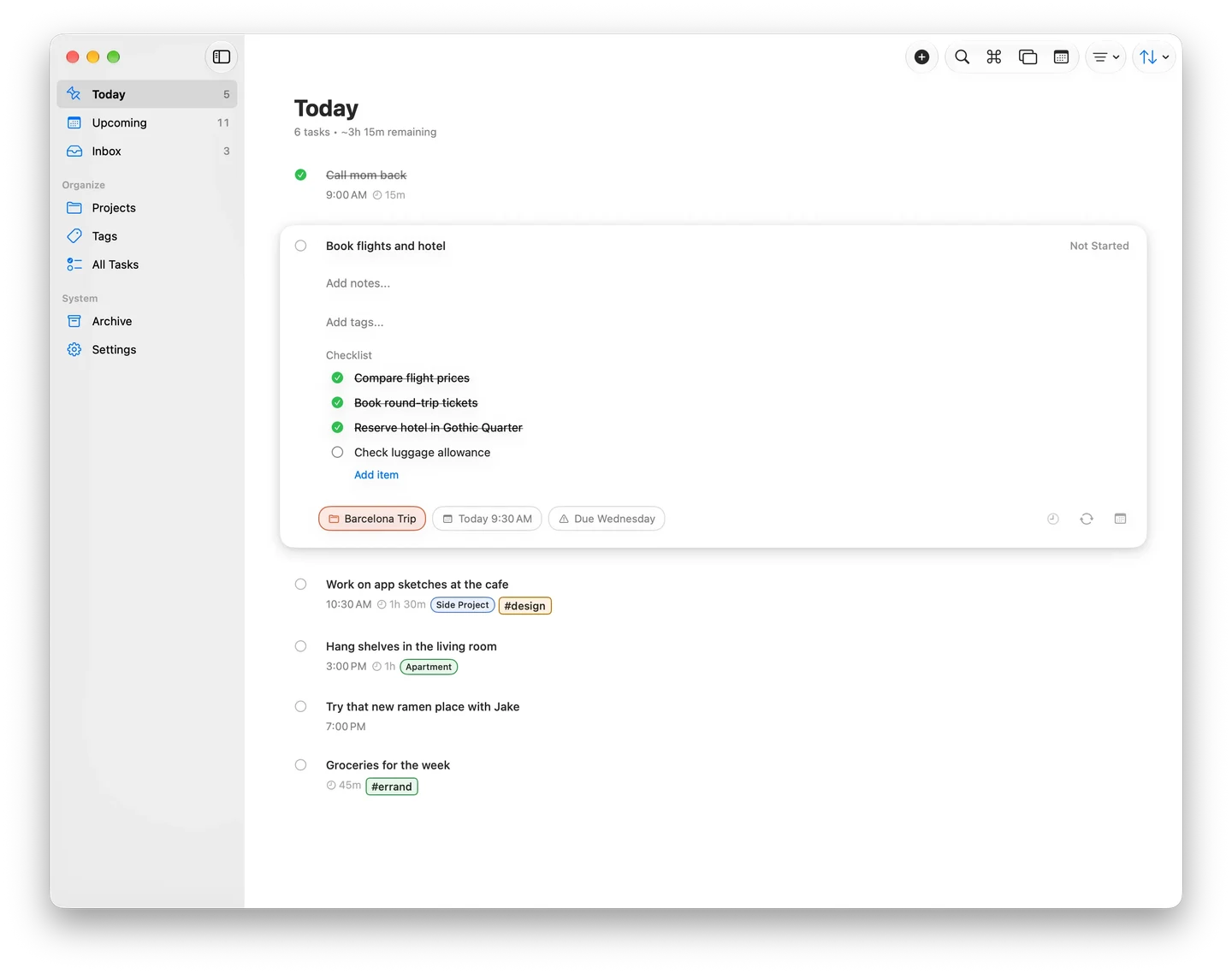
Pinwork can combine filters for status, project, tags, estimate, and dates. For example, choose Consulting and the writing tag, then sort by estimate to bring shorter writing tasks to the top. The tasks keep their project and tags.
Filter and sort preferences are remembered separately for each list and project on the current device. These local preferences do not sync through iCloud. The filter guide explains the combinations.
TickTick Premium offers named custom filters with AND/OR conditions. That is a strength for people who rely on reusable custom lists. Pinwork’s filters, projects, and tags are included with every paid access option, including lifetime, so that organization can be part of a one-time purchase.
Connect tasks to the Apple Calendar you use
In Pinwork, an estimate can become time set aside for the task. With Calendar access, a task planned for 10:00 AM with a 45-minute estimate can create a linked event occupying that time in Apple Calendar.
Once the task has a When date, time and title changes can sync between it and the event. If both change before syncing, the task takes precedence. Full Calendar access is required. The Calendar guide covers the linked fields and setup.
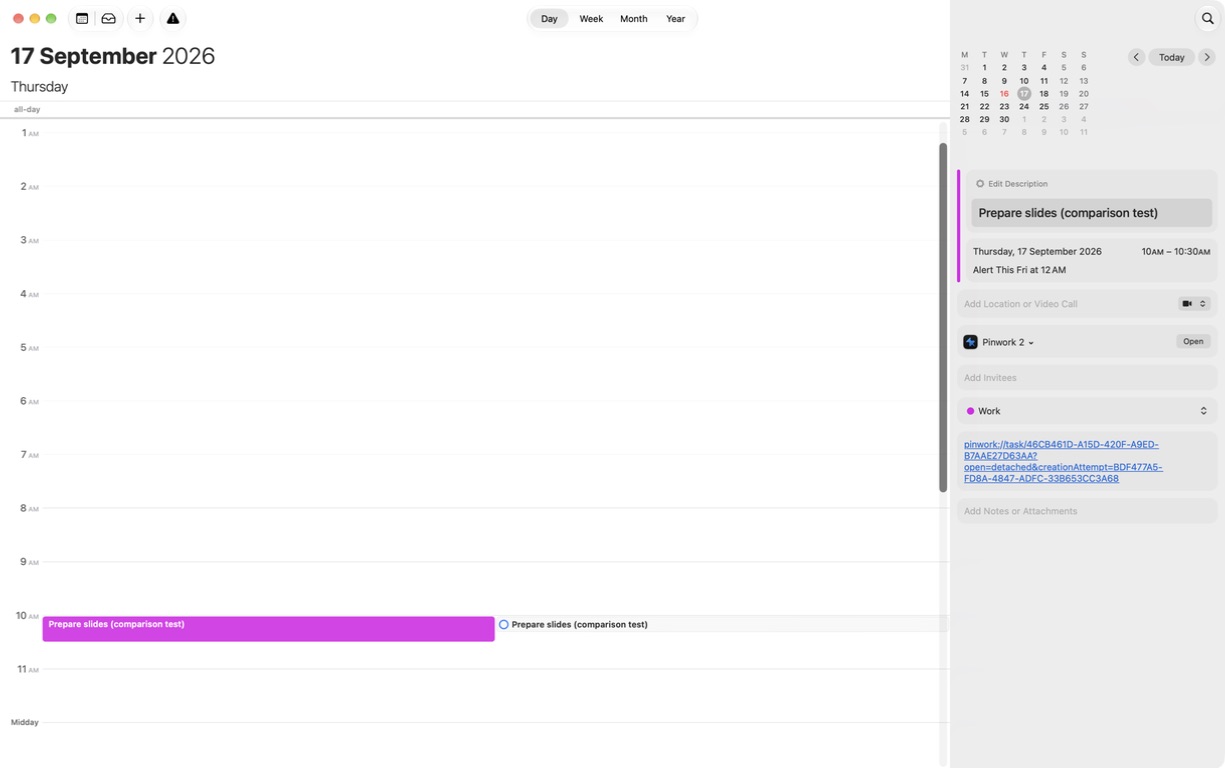
TickTick also offers calendar connections, including iCloud. Its Premium duration supports start and end times, even across days. Pinwork uses separate When and Deadline fields, with the estimate describing the work session. Try moving a linked event in Apple Calendar and checking the updated task in Pinwork.
Keep your personal tasks in iCloud
Pinwork has no separate app account. Tasks are stored locally and sync through your private iCloud database. You can create, edit, and complete tasks offline; changes wait for iCloud to become available.
TickTick uses its own service to sync tasks across Apple and non-Apple devices. Pinwork keeps your personal tasks in iCloud.
There is no Pinwork server holding your task database. RevenueCat handles purchase verification separately, without receiving task titles or notes. The sync and privacy guide explains both services.
Pay once for the workflow
Pinwork costs $4.99 monthly, $34.99 yearly, or $79.99 once for lifetime access. All options unlock the same features on iPhone, iPad, Mac, and Apple Watch using the same App Store Apple Account.
TickTick Premium lists $4.99 monthly or $49.99 yearly. At these US prices, two yearly Premium payments total $99.98. Pinwork lifetime is $79.99 with no recurring subscription charge. Use the subscription cost calculator to compare your renewal price.
TickTick Free remains a reason to stay if it covers your needs. Pinwork has no permanent free tier. Its subscription plans include a 7-day trial; without active access, existing tasks remain visible but edits are blocked.
Try it with a few real tasks
Add a few tasks you already need to do. Give one a project, a tag, and an estimate, then find it again from Today or its project. You can try Calendar links and project reviews once you have a feel for the app.
Pinwork is a strong fit when you want that personal workflow on Apple devices, with private iCloud sync and the option to buy lifetime access. Keep TickTick if shared task assignment, habits, the Eisenhower matrix, or access from Windows, Android, Linux, and the web are central to your day.