An AI chat can prepare a Pinwork task without connecting to a task account.
Paste the prompt template below into ChatGPT, Claude, or another chat, answer
its questions, and ask it to return one pinwork://add link. Open the URL on an
Apple device with Pinwork installed, and Pinwork receives the task as explicit
fields rather than one block of text.
The link can include a title, notes, When, Deadline, list, project, tags, and estimate. Depending on the parameters and platform flow, Pinwork creates the task or opens it for review. One link handles one task.
What the AI hands to Pinwork
The AI does not need access to a Pinwork database. Its job is narrower: turn
the details already present in the conversation into a correctly encoded URL.
Pinwork’s add deep link accepts these structured
concepts:
| Parameter | Pinwork field | Purpose |
|---|---|---|
title | Title | Names the task |
notes | Notes | Keeps supporting context |
when | When | Sets the planned date or time |
deadline | Deadline | Sets the last acceptable date or time |
list | Destination | Uses Inbox, Today, Next, Later, or Someday |
project | Project | Assigns the task to a project |
tags | Tags | Adds task labels |
estimate | Estimate | Records expected duration |
When and Deadline are separate on purpose. When answers, “When is this work planned?” Deadline answers, “What is the last acceptable day to finish it?” An AI can extract both from a conversation and preserve the distinction in the link.
This route differs from pinwork://quickadd. Quick Add sends one text string
through Pinwork’s natural-language parser. The add route receives fields that
the AI has already separated. It is the better fit when a chat contains enough
context to identify a project, notes, an estimate, or a separate Deadline
without packing everything back into one sentence.
Special characters must be URL encoded. Spaces become %20, for example, and
a colon in a time becomes %3A. Encoding matters for titles, notes, project
names, tags, and other values that contain punctuation or spaces.
Write an estimate as a whole number of minutes from 1 to 1,440. Tags use a comma-separated value. A tag that does not exist yet is created when the link is applied.
The project value must name a project that already exists in Pinwork. A link
that names an unknown project fails as a whole instead of silently creating
the project, which protects the project list from misspelled AI output. When
the conversation has not confirmed a real project name, leave the parameter
out and file the task from Inbox later.
Use the conversation to settle the fields
Start with one concrete action from the chat. A long planning conversation may contain background, decisions, and several possible next steps, but the link needs a single task title. Ask the AI to identify that action before it starts assembling parameters.
Then resolve the two dates independently. A sentence such as “Work on the proposal Tuesday, but send it by Friday” contains a When of Tuesday and a Deadline of Friday. If the conversation only says “Send the proposal Friday,” the AI should ask whether Friday is the planned work day, the last acceptable day, or both. That question prevents a useful scheduling distinction from being flattened into one date.
Notes should carry context that helps complete the task, not a transcript of the entire chat. A short decision, file name, or expected outcome is usually enough. Project, tags, estimate, and destination should appear only when the conversation establishes them. This produces a shorter link and makes every encoded field easier to inspect.
Finally, ask for the link. The AI should encode the values, preserve the documented parameter names, and return a readable field summary beside the URL. That summary is a check, not a second source of task data.
A deep link carries one task
The structured route has a useful but deliberate limit. One pinwork://add
link represents one task. It does not accept:
- recurrence
- checklist items
- an add-to-calendar command
- a batch of tasks
Those details should not be hidden in invented query parameters. If a conversation produces several actions, ask the AI for one link per task. Open and inspect the links one at a time instead of combining them into one supposed batch link.
Recurrence and Calendar commands belong to supported natural-language capture
paths instead. pinwork://quickadd can parse recurrence phrases and Calendar
commands from a text string. That is a different route with different
behavior, described in the automation guide. A checklist
still needs to be added through Pinwork’s task editing controls.
This limitation also makes the handoff easy to inspect. The link contains one task’s fields, and Pinwork can open that task for review depending on the platform flow. Nothing in the link silently expands into a project plan.
A worked example
Suppose an AI chat has reached this conclusion:
Review the launch checklist tomorrow. Put it in the Side Project project, tag it launch, allow 45 minutes, and keep the note “Check copy and App Store assets.”
The AI can turn that answer into one URL:
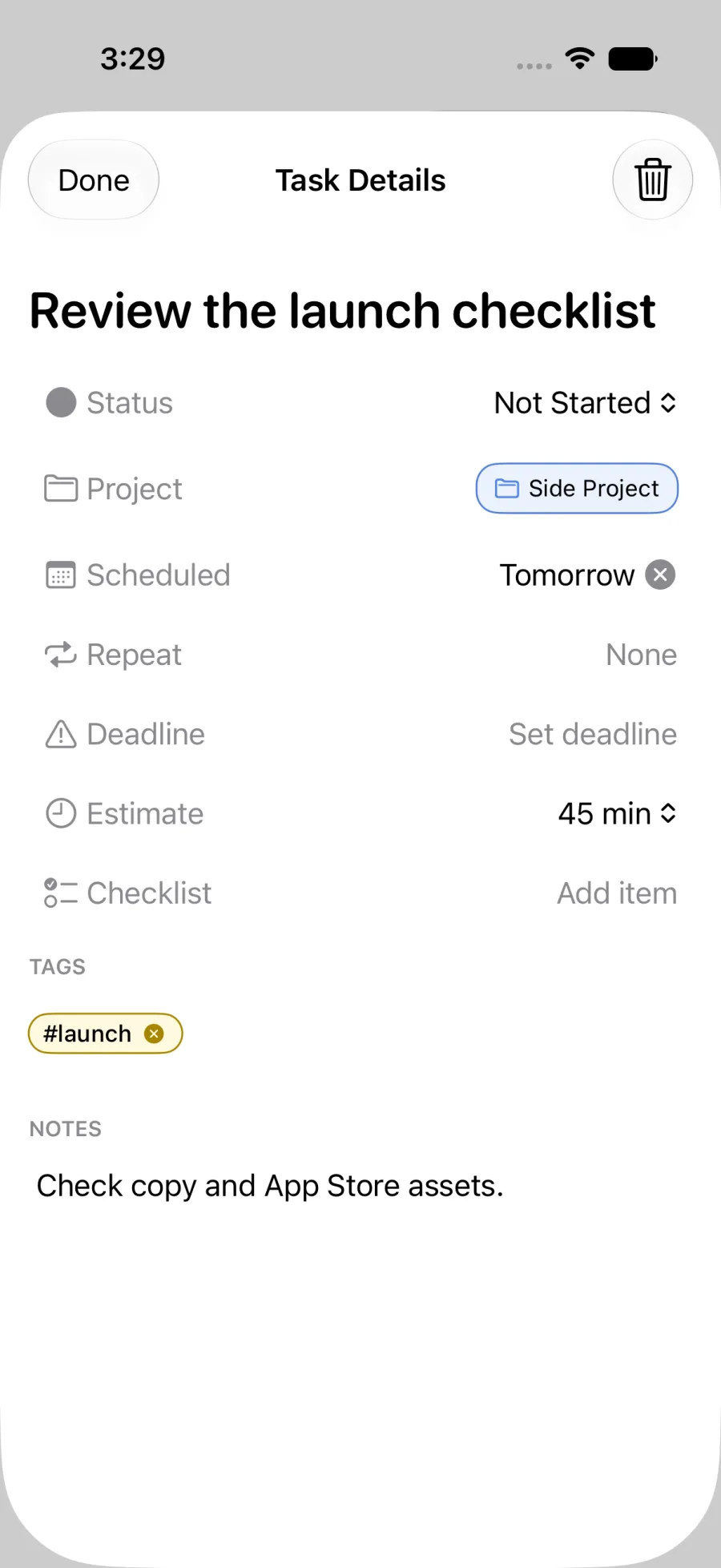
pinwork://add?title=Review%20the%20launch%20checklist¬es=Check%20copy%20and%20App%20Store%20assets.&when=tomorrow&project=Side%20Project&tags=launch&estimate=45The readable parts have become explicit query parameters. The title and notes are percent encoded, and the project, tag, When value, and estimate are carried alongside them. There is no recurrence parameter, checklist payload, Calendar instruction, or second task.
The AI should not guess fields that the conversation never established. If the
date is ambiguous, the safer result is a question before the link. If no
Deadline exists, omit deadline rather than copying the When date into it.
The same rule applies to project, tags, estimate, notes, and destination.
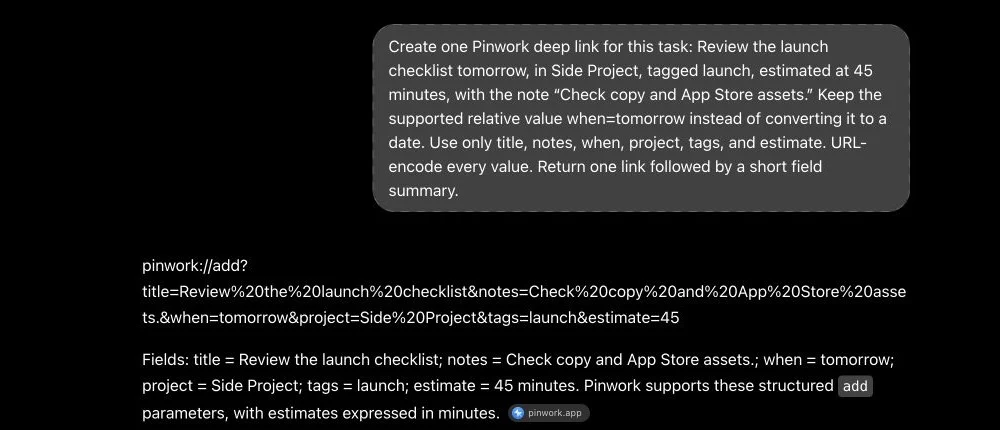
Before opening a generated link, scan its parameter names. Every name after
? or & should come from the documented set. The encoded values may look
less familiar, but the field summary should still match the intended title,
When, Deadline, project, tags, destination, notes, and estimate.
The task can also be reviewed in Pinwork when the platform flow opens it instead of creating it immediately. That is the moment to correct a date the conversation left unclear or remove context that does not belong in the task. The AI organizes the handoff, while Pinwork remains responsible for applying the task fields.
A reusable prompt for any AI chat
The following prompt keeps the AI inside the route’s documented scope. It asks for missing information instead of filling gaps with assumptions, and it forbids unsupported fields.
Turn the conversation into one task for Pinwork.
Before creating the link, ask one concise question at a time for any essentialdetail that is missing or ambiguous. Do not invent task details.
Then output exactly one pinwork://add URL for one task. Use only these queryparameters when the corresponding value is known:
title, notes, when, deadline, list, project, tags, estimate
For when and deadline, use today, tomorrow, next_week, someday, a date such as2026-08-31, or an ISO datetime with an explicit timezone such as2026-08-31T09:00:00+02:00. Write estimate as a whole number of minutes, such as45, within the supported range of 1 to 1,440. Write tags as a comma-separatedlist. For list, use only inbox, today, next, later, or someday. Include projectonly when it names a project that already exists in Pinwork; a link naming anunknown project fails.
Keep When, the planned day for doing the work, separate from Deadline, the lastacceptable day for finishing it. URL encode every parameter value, includingspaces, punctuation, hash signs, quotes, and time separators.
Do not include recurrence, checklist items, an add-to-calendar command, or morethan one task. Do not invent other parameters. After the URL, give a shortplain-text summary of the fields encoded in it.
The final summary is useful for checking the link before tapping it. The URL remains the actual handoff. If the AI returns prose inside the URL, multiple URLs, or an unfamiliar parameter, ask it to regenerate the result within the listed field set.
Why the AI does not need the task list
This workflow gives the AI only the conversation used to define the task. It does not require the chat service to read existing Pinwork tasks, projects, or history. The output is a URL that Pinwork handles on the device. You still choose what task context to share with the chat service, and you can inspect the complete handoff before opening it.
Opening the link still changes task data, so Pinwork blocks the action while access is locked. Once access is restored, the link can proceed through the platform’s add flow.
For the complete route behavior and field boundary, keep the deep links guide beside the prompt when refining an AI workflow.